1. View에서 리소스 폴더의 이미지 불러오기
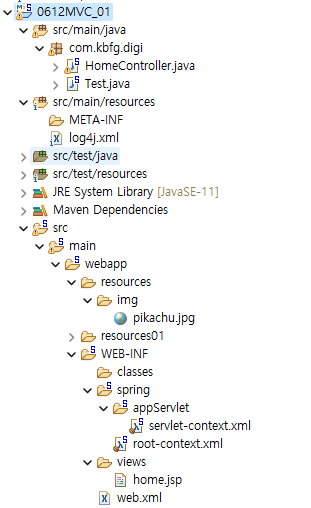
<servlet-context.xml>
- resource 파일 경로 등록해두기
<resources mapping="/resources/**" location="/resources/" />
<resources mapping="/resources01/**" location="/resources01/" />
<home.jsp>
- view에서 resource 파일 불러오기
<img src="./resources/img/pikachu.jpg" alt="Pikachu"/>
<img src="./resources01/img/pikachu.jpg" alt="Pikachu"/>
<img src="${pageContext.request.contextPath}/resources/img/pikachu.jpg" alt="Pikachu"/>
<img src="${pageContext.request.contextPath}/resources01/img/pikachu.jpg" alt="Pikachu"/>
2. Model 객체를 이용한 데이터 넘기기
(1) 단일 값을 받는 경우
@Controller
@RequestMapping("/board")
public class ViewController {

	@RequestMapping(value = "/content", method = RequestMethod.GET)
	public String boardcontent(Model model) {	 //매개변수에 model 넣기
		model.addAttribute("id",30);		 	 //model에 데이터 넣기
		return "/board/content";
	}
}
<content.jsp> view 파일
<%@ page language="java" contentType="text/html; charset=UTF-8" pageEncoding="UTF-8"%>
<!DOCTYPE html>
<html>
    <head>
    <meta charset="UTF-8">
        <title>Insert title here</title>
    </head>
    <body>
        content.jsp입니다<br/>
        id : ${id}
    </body>
</html>
(2) HttpServletRequest 객체의 매개변수를 받는 경우
@RequestMapping("/checkId")
public String checkId(HttpServletRequest httpServletRequest, Model model) { //매개변수에 httpServletRequest 객체
	String id = httpServletRequest.getParameter("id");
	String pw = httpServletRequest.getParameter("pw");
	model.addAttribute("identify", id);
	model.addAttribute("password",pw);
	return "/board/checkId";
	}
(3) 어노테이션(@RequestParam)으로 매개변수를 받는 경우
@RequestMapping("/checkId")
public String checkId(@RequestParam("id") String id,@RequestParam("pw") int pw, Model model) {
    model.addAttribute("identify", id);
    model.addAttribute("password",pw);
    return "/board/checkId";
}
(4) 어노테이션(@RequestParam)과 VO 객체 이용하는 경우
@RequestMapping("/join")
public String checkId(@RequestParam("name") String name,
                      @RequestParam("id") String id,
                      @RequestParam("pw") String pw,
                      @RequestParam("email") String email, Model model) {

    Member member= new Member();  //VO객체 생성
    member.setName(name);
    member.setId(id);
    member.setPw(pw);
    member.setEmail(email);

    model.addAttribute("memberInfo", member);
    return "/member/join";
}
(5) VO 객체 이용하는 경우***
- 스프링에서는 데이터 이름을 이용해서 클라이언트에서 전송된 데이터를 VO 객체의 멤버 필드에 자동으로 할당함
	@RequestMapping("/join")
	public String checkId(Member member) {
		return "/member/join";
	}
(5-1) VO 객체 별칭 만들기(@ModelAttribute)
- 데이터 이름(인스턴스 이름)이 명확히 일치해야하는 특성 상, 불러올때는 데이터 이름 그대로 불러오되 별칭을 짓고 싶은 경우
	@RequestMapping(value="/studentView", method = RequestMethod.POST)
	public String studentView(@ModelAttribute("studentInfo") StudentBean studentBean) {

		return "studentView";
	}
(6) @PathVariable 태그
- url : http://localhost:8080/digi/studentView/10
@RequestMapping("/studentView/{studentId}")  //url 입력 http://localhost:8080/digi/studentView/10
public String studentView(@PathVariable String studentId, Model model) {
    model.addAttribute("studentId",studentId);
    return "student/studentView";
}
3.ModelAndView 객체를 이용한 데이터 넘기기
@Controller
@RequestMapping("/board")
public class ViewController {

	@RequestMapping("/reply")
	public ModelAndView boardReply() {
		ModelAndView mv = new ModelAndView();
		mv.addObject("id",500);  	//ModelAndView 객체에 model 데이터 입력
		mv.setViewName("board/reply"); 	 //ModelAndView 객체에 view 입력
		return mv;
	}
}
- POST 방식
@RequestMapping(value = "/studentView", method = RequestMethod.POST) //url 입력 http://localhost:8080/digi/studentView/studentId=10
public ModelAndView studentPostView(HttpServletRequest httpServletRequest) {
    String id = httpServletRequest.getParameter("studentId");
    ModelAndView mv = new ModelAndView();

    mv.addObject("studentId",id);
    mv.setViewName("student/studentView");

    return mv;
}
- VO객체를 이용하는 경우
@RequestMapping(value = "/studentView", method = RequestMethod.POST) //url 입력 http://localhost:8080/digi/studentView/studentId=10
public ModelAndView studentPostView(Member member) {

    ModelAndView mv = new ModelAndView();

    mv.addObject("member",member);
    mv.setViewName("student/studentView");

    return mv;
}'BackEnd > Spring' 카테고리의 다른 글
| [Spring]Validator를 이용한 유효성 검사 (0) | 2024.06.17 |
|---|---|
| [Spring]IntelliJ 자바 버전 변경하는 방법 (0) | 2024.06.15 |
| [Spring]AOP(Aspect Oriented Programming)_스프링 핵심원리(고급편) (0) | 2024.06.11 |
| [Spring]Spring Environment (0) | 2024.06.10 |
| [Spring]Bean 생성주기 (0) | 2024.06.10 |